On a retainer, every month is its own small budget. The sum is always the same: monthly amount + what came over from last month = available, minus what was used. This chapter explains what counts, how rollover works, and where you keep the overview.
What counts as used
Approved billable hours (at the rate stamped at booking time) plus the additional costs set to within budget. Hours still waiting for approval are visible but do not count yet; costs set to billed additionally leave the budget alone and go on top of the fee.
Rollover
With fee rollover enabled on the project, the difference moves into the next month: what remains raises the next budget, an overrun lowers it. With it off, every month starts clean on the monthly amount. An example:
| Month | Budget | Rolled over | Available | Used | Into next month |
|---|---|---|---|---|---|
| January | € 5,000 | — | € 5,000 | € 4,200 | + € 800 |
| February | € 5,000 | + € 800 | € 5,800 | € 6,100 | − € 300 |
| March | € 5,000 | − € 300 | € 4,700 | … | … |
For work from before the project existed there is the initial rollover: an opening balance for the very first month. Positive means the client has credit, negative that there is catching up to do.
Important: the rollover balance is fixed at the moment you finalise that month’s report. So enable rollover before generating the first report; a report generated without rollover shows € 0 carried over, and changing project settings afterwards does not update an existing report.
The year overview
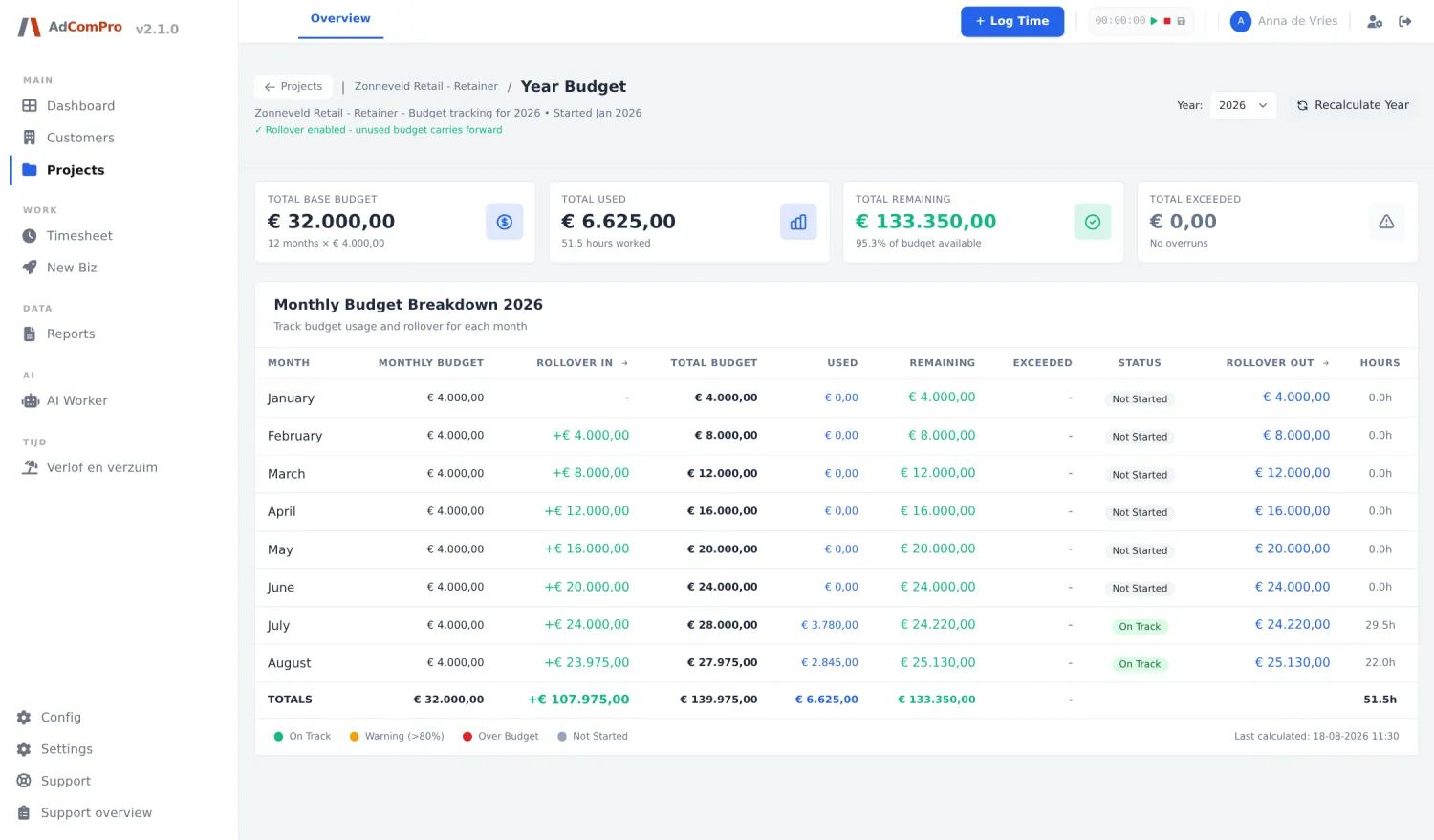
The Year budget button on the project detail shows a whole year in one table, one line per month: monthly amount, rolled over, available, used, remainder and booked hours. On a recurring series you automatically get the consolidated overview of the whole series, because a retainer runs across projects.
- A month with an invoice badge is based on the finalised report: those figures are fixed. Without the badge the month is still calculated from the time entries and can still shift.
- The status column (on track, watch out, over budget) measures against the original monthly amount, so an overrun stays visible even when rollover softens it.
- There is also the Budget Tracking overview with all series and standalone projects side by side, month by month, including the split per company.
Balance corrections
Sometimes money moves outside the retainer: you invoice part of an overrun separately, or you send a credit note. The balance has to follow, but you cannot just overtype it. Open the report of the month it concerns and use Correct balance in the budget block: amount, kind and a reason. Positive improves the balance, negative lowers it. It only works while the report is still a draft, and it never changes what that report invoices. The year overview then shows an extra Correction column, with below the table who entered what and why.
Invoicing in dollars
Per project you pick the invoice currency: euro or dollar. For a dollar project:
- The monthly fee is entered directly in dollars (say $ 5,000) and stays exactly the same every month; it is never converted.
- The hourly rate stays in euros. The dollar rate per hour is the euro rate times the monthly average of the official ECB rates of the previous month. That month is closed, so the rate is fixed for the whole invoice month and old reports never change retroactively.
- A rolled-over balance carries in dollars and is not converted again: a credit of $ 200 stays $ 200. The report states per month which rate was applied.
Your euro margin per hour stays constant while the client sees a predictable dollar amount.