Retainer work almost never lands exactly on budget. One month there is time left over, the next month it runs over. In many systems that difference simply evaporates: the budget is back at zero every month and nobody can see anymore what was left behind. See the worked example of unused retainer budget and the agreements behind the balance.
The problem
The difference disappears from view
Say a customer pays a fixed amount per month. In March you work less than agreed, in April a project overruns and you work considerably more. If you don’t keep track of that, you have two conversations that are both unpleasant. In the first case you invoice something you didn’t do. In the second case you do work that can no longer be found anywhere.
The tricky part is that the problem only becomes visible late. One month makes little difference, but a year of small differences adds up to an amount nobody can explain anymore.
How AdComPro does it
The remainder rolls over to the next month
AdComPro keeps a monthly budget per project, deducts the logged hours and the costs incurred, and carries what is left into the month after. If you come up short, the shortfall is shown in red instead of dropping out of sight. Accurate agency time tracking keeps that balance meaningful; automatic retainer renewal prepares the next project period.
What you see per month
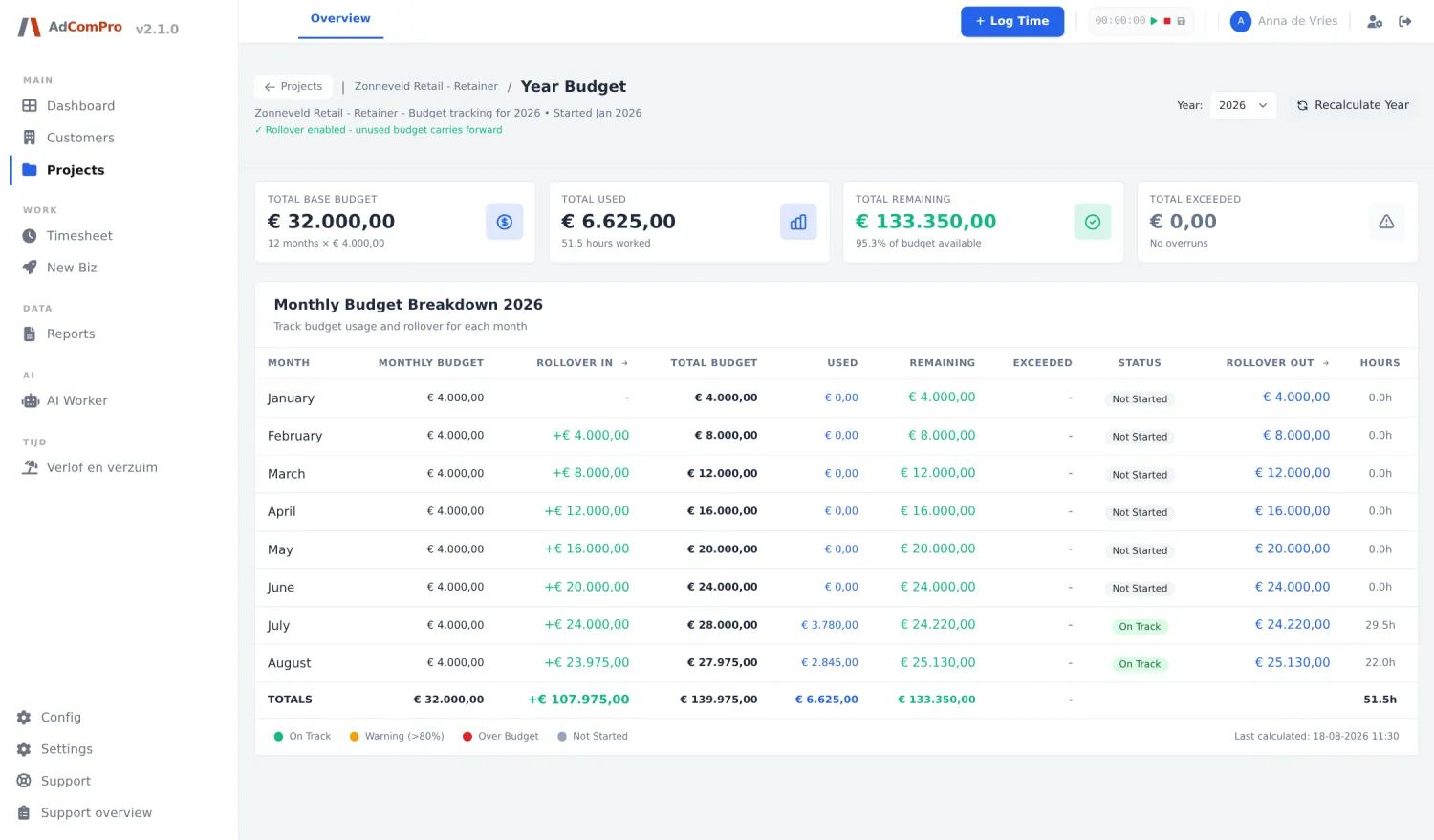
- This month’s budget, and what came along from the previous month
- The logged hours and the costs that are deducted
- What is left, and how much of it rolls over to the next month
- The history per project, so you see the pattern and not just this month
Additional costs belong there too. You can record them as one-off or recurring and mark them as within the monthly amount or on top of it. Think of hosting, software, licences or purchased services, with supplier and reference attached, so you can later trace where an item came from.
Questions
What people ask about this
Does a shortfall roll over too?
Yes. If you work more than the budget, the excess carries over to the next month as a shortfall and is shown in red. That keeps it visible that there is something to make up, instead of it quietly disappearing.
Can I see how it went over a longer period?
Yes, the budget history per project shows the months side by side. That is where you get the pattern from: a customer who structurally stays under budget needs a different conversation than a customer who goes over it every month.
Do non-billable hours count?
You log those in the same overview, but you mark them as non-billable. So they don’t draw on the budget, while you still see how much time actually went into the project.
Try it yourself
Run a month through it
Put a running retainer into AdComPro for a month and see at the end of the month what rolls over. All features are included, no credit card required.