
Project management software and time tracking for agencies.
Plan projects, track and approve time, monitor budgets and create invoices from one platform. Built for agencies and consultancies that need control over planning, costs and profitability — without disconnected spreadsheets or duplicate work. See how time tracking for agencies connects daily work to invoicing and the Exact Online integration.
Your first year at half the annual price
Choose an annual subscription and receive 50% off the regular annual price for your first subscription year. Setup and onboarding assistance are included.
Standard
Regular annual price: €215.40
€107.70
per user for the first year
Partner
Regular annual price: €269.40
€134.70
per user for the first year
All amounts exclude VAT. The annual amount is paid in one instalment. The discount applies to the first year of a new annual Standard or Partner subscription. From year two, the regular annual price applies: €215.40 for Standard or €269.40 for Partner per user. The discount covers the subscription; monthly plans and separately quoted custom development are excluded.
Request by .
Tell us your plan and number of users. We confirm the annual price and arrange setup with you.
In short
What AdComPro is
AdComPro is project management software for agencies, studios and consultants who bill by the hour. Projects, time tracking, budgets, invoicing and client records live in one system, so an hour that is logged reaches an invoice without anyone retyping it.
You break work down into projects, milestones and tasks. People log hours against the level they actually worked on, and those hours pass an approval step before they can be billed. Budgets are tracked per month and carry what is left into the next one. The invoice is then generated from the approved hours and costs, in your own template. Alongside that sit client records with a full change history, reports on profitability and budget consumption, and an assistant you can ask questions of in plain language.
AdComPro has a modular architecture. Fields, workflows and reports can therefore be adapted to your organisation. Setup and onboarding assistance are included with an annual subscription; later changes are quoted at a reduced development rate.
Find out whether AdComPro fits your agency
Use the trial month for a familiar assignment. Work through your usual monthly steps and assess whether the team, project lead and administration have the information they need.
1 · Start with one client project
Set up the pricing agreement, budget and tasks. Choose an ongoing assignment or a monthly client agreement you know well.
2 · Work through it with your team
Log time and costs, review the entries and check the remaining budget. See how delivery and financial oversight connect.
3 · Review the client draft
Prepare a draft invoice and check the hours, rates and costs against your agreements. Discuss any setup needs or additional requirements with Marcel.
You can request a personal demo first. Setup assistance is included with an annual subscription; migration, training and additional development are discussed in advance.
Why it exists
Four separate tools make reliable month-end reporting unnecessarily difficult
When time, budgets, invoices and client records are spread across different systems, work is duplicated and the risk of errors and missed revenue increases.
The retainer that ran out
A client is on a monthly fee, this month you worked less and next month more. What happens to the difference? In most tools: nothing, and you find out in the quarter.
The hour from another entity
Someone from a sister company works on the project. Whose hour is it, at whose rate, and on whose invoice does it land?
The one rate exception
One task is billed at a different rate. In most systems that means editing forty time entries by hand, and finding out in June that you missed three.
What it does
Six core capabilities, one system
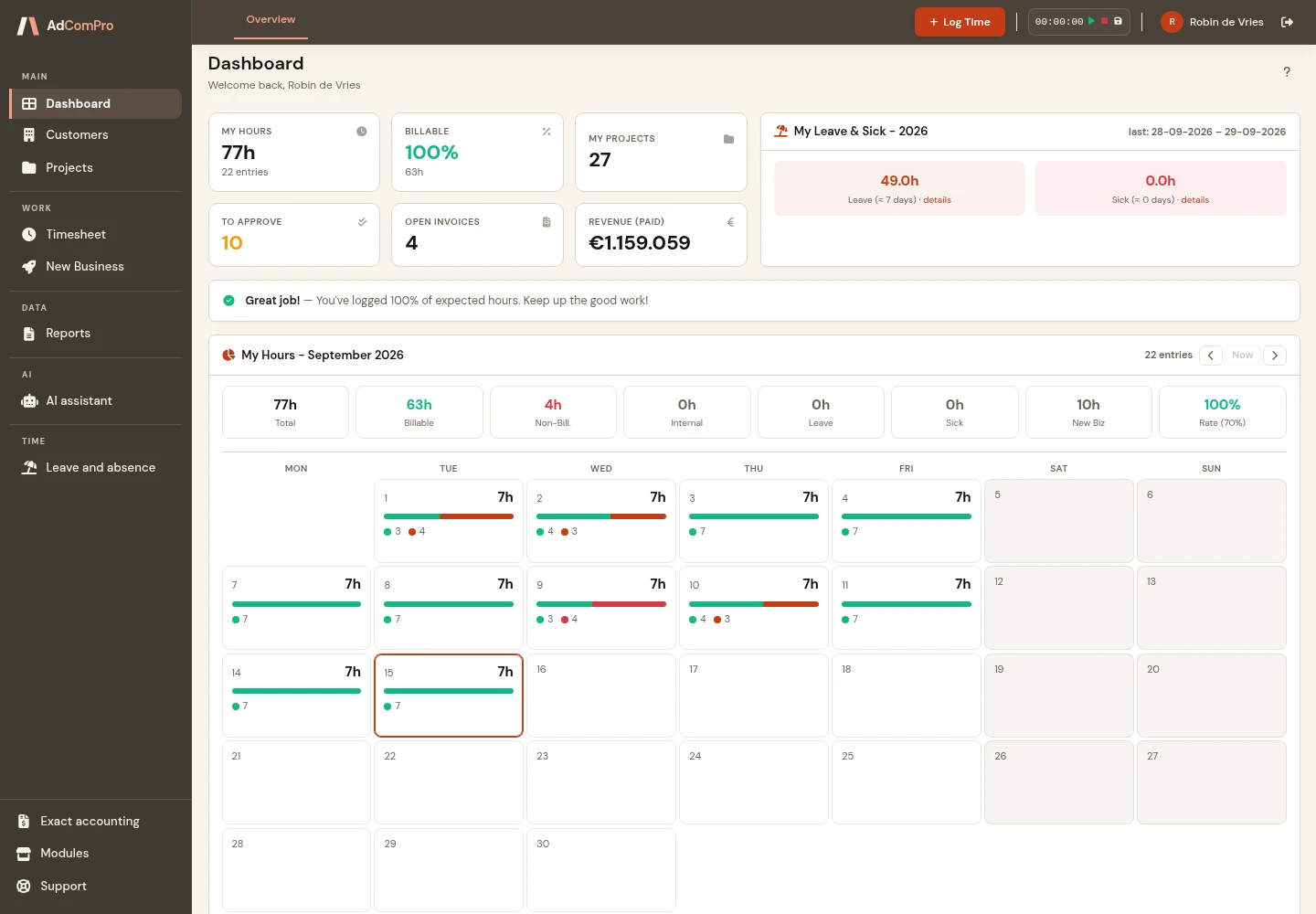
Project management
Complete hierarchy of projects, milestones and tasks. Drag and drop to reorder.
Time tracking
Log hours against any level of the hierarchy, with an approval workflow before anything is billed.
Invoicing
Generate invoices straight from logged time and costs. Customisable templates, payment status tracking.
CRM
Customers, contacts and companies with a full activity log, so you can see who changed what and when.
Reports
Profitability per project, budget consumption, project health. The numbers you need before a client call.
AI assistant
Ask which projects are over budget, how many hours are still uninvoiced, or where the time went. In plain language, answered from your own data.
AdComPro on your phone
Track your time and reach client contacts. Wherever work takes you.
After a client meeting, between projects or on site: record your time while the work is still fresh in your mind. AdComPro has a dedicated phone view for the tasks you need on the go.
Record time quickly
Log project time or internal time using a compact form. Once saved, the entry appears immediately under My hours.
See your own hours
Review your entries by week and check what you have already recorded. A clear list keeps your hours readable on a small screen.
Keep client contacts close
Search for a contact or company, call or email directly, and download a contact card to save their details in your phone’s address book.
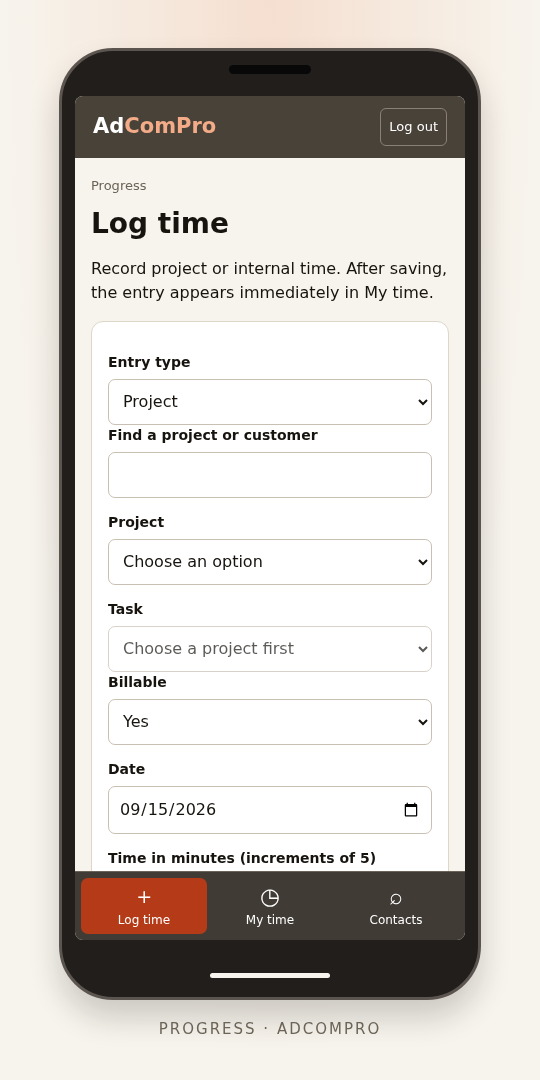
A phone screen calls for focus
When you are out and about, you want to finish a task quickly. The phone view focuses on time entry, your own hours and contacts, with clear buttons and concise overviews. Use the full environment on your laptop or desktop for planning, project management, reports and invoicing.
Every kind of agreement
Seven kinds of project, one administration
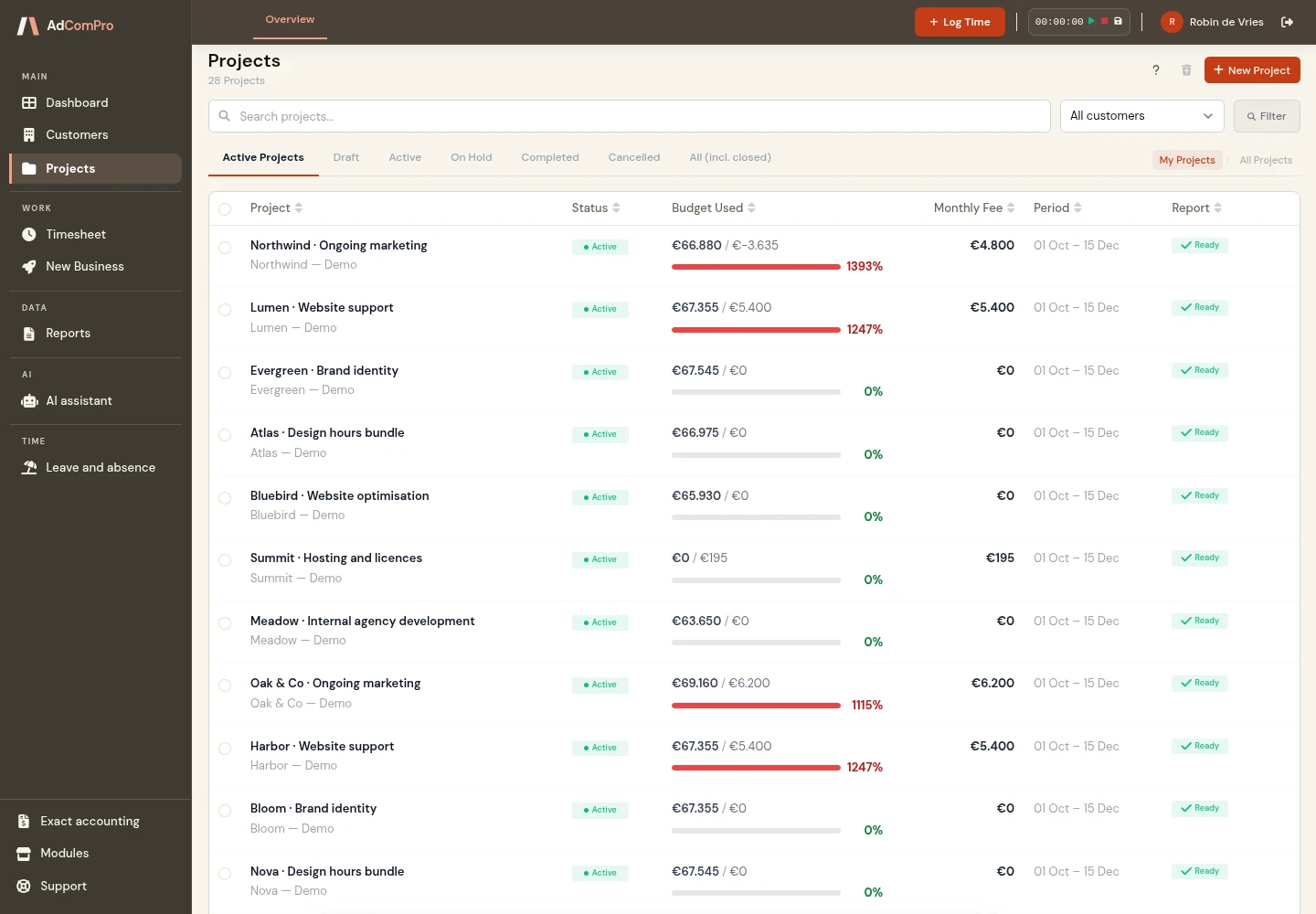
Not every client agreement is billed the same way. The kind you pick decides what the hours run against, when an invoice appears, and whether hours are logged at all — and the form drops the fields that do not belong to it. Each kind is its own module as well: switch off what you do not use and it leaves the list too. Keep one and there is nothing left to choose.
Retainer
A fixed amount per month. Hours run against a monthly budget and what is left carries into the next month.
Support subscription (SLA)
The pot is in hours instead of euros. Above the included hours a second rate takes over, and unused hours lapse.
Fixed price
One contract sum, invoiced in terms. What you watch here is the margin against what has been spent, not the month.
Prepaid hours
Hours bought up front and invoiced at purchase. The oldest bundle goes first, so expired hours stay apart from used ones.
Time and materials
Hours times rate, per period. A ceiling warns you before the conversation with the client gets awkward.
Subscription without hours
Hosting, licences and other fixed amounts per period. The one kind that takes no hours at all.
Internal
Hours for cost insight, never an invoice. What the agency spends on itself stays visible.
Which one fits where?
Each kind brings its own fields, its own figures and its own warnings. All features in detail
Ask instead of dig
The questions you would otherwise open four screens for
The assistant reads your own projects, hours, budgets and invoices, and answers from the same numbers the rest of the platform uses. In plain language, without building a report first.
“Which projects are over budget this month?”
With the amount each one is over, not just a list of names.
“How many billable hours are still uninvoiced?”
Per project or per client, so you know what is still sitting there.
“Which projects have gone quiet?”
Active projects with no hours logged in the last thirty days.
“What needs my attention?”
A scan for under-reported hours, large deferrals and stalled work.
Made to fit
Built from modules, and every one can be adapted
One workspace for your agencyConnected modules, built around your workflow.
- ProjectsWork and planning
- TimeTrack and approve
- BudgetsCosts and headroom
- InvoicingFrom time to invoice
- CRMClients and agreements
- ReportsProfitability insights
- Choose what you use
- Adapt fields and workflows
- Expand as you grow
AdComPro is not one block of software. Projects, hours, budgets, invoicing, client records and reports are separate pieces that work together. That is what makes them adjustable without the rest breaking.
Set up around your way of working
We go through it together: what you track, what you never fill in, which steps your work goes through, which figures you want to see. Then we set it up that way. Setup and onboarding assistance are included with an annual subscription. For a monthly subscription, we agree on setup assistance in advance.
Wishes that come up a year from now
Organisations change and a module has to change with them. Those requests are quoted per request at a reduced rate, below the normal development rate. And if a setting already does what you were about to pay for, we will tell you that instead.
Who works in it
From one person to a group of companies
Freelancers
Hours, a budget and an invoice that follows from both, without a spreadsheet in between.
Studios
A handful of people entering hours, one person approving them before anything is billed.
Agencies
Clients on monthly retainers, budgets that roll over, and a month-end that has to balance.
Groups of entities
People from different companies on one project, each with their own permissions and their own rate, and charging between your own entities.
Pricing
€19.95
per user, per month for Standard, or €17.95 with yearly billing. Partner, with 20% off custom development and a named contact, is €4.50 more per user.
One price, every feature. No modules to unlock, no per-seat tiers to outgrow, no account activation fee. Add or remove users whenever your team changes and the change applies immediately.
Alongside other packages
How AdComPro compares
An agency looking at AdComPro usually looks at these as well. Everything below comes from their own product pages, so you can check it yourself.
| Package | What their own pricing page says | Five people |
|---|---|---|
| AdComPro50% off your first year | €19.95 per user per month, every feature included. €17.95 with yearly billing. Partner, with 20% off custom development, €4.50 more. New annual subscription: 50% off the regular annual price. Standard costs €107.70 per user for the first year. Setup and onboarding assistance included. Request by . View the offer terms → | Monthly plan: €99.75 per month. Offer: €538.50 for 5 users in the first year Equivalent to approximately €44.88 per month. Pay the annual amount upfront in one instalment. From year two: €1,077.00 per year for 5 users. Prices exclude VAT. |
| Teamleader Focus | From €37.50 per user per month. Project management runs through a paid Booster, €45 per month per account. | €232.50 |
| Exact Gripp | From €162 per month including 3 users, €19 per extra user. | €200.00 |
| Simplicate | €24.50 per user per month. Their own example for five users: €258.50. | €258.50 |
| Odoo | €24.90 per user per month, all apps included. €19.24 when billed annually. Support is included, setting it up is not. | €124.50 |
| Productive | Essential €11 per user per month, €9.50 with yearly billing. The comparable plan is Professional: €27 per user per month, €23 yearly — that is where approving hours, recurring budgets and the accounting link start. Minimum 3 users. Ultimate: on request. | Professional €135.00 |
| Teamwork | Basics 9.99 per user per month, billed yearly, in your own currency. The comparable plan is Accelerate: 24.99 per user per month, billed yearly, minimum 5 users — that is where time budgets, retainers, invoicing and capacity planning start. Optimize: on request. | Accelerate €124.95 |
Productive — very strong agency finance, retainers, planning and profitability; more features and more complexity. Teamwork — strong day-to-day project management and client work; the financial side is less integrated.
What is included
The comparison is based on what agencies need. Differences and missing functionality are therefore stated explicitly.
| Feature | AdComPro | Teamleader | Gripp | Simplicate | Odoo | Productive | Teamwork |
|---|---|---|---|---|---|---|---|
| Project management | ✓ | Booster +€35/mo | ✓ | ✓ | ✓ | ✓ | ✓ |
| Time tracking | ✓ | ✓ | ✓ | ✓ | ✓ | ✓ | ✓ |
| Approving hours | ✓ per person: automatic or for review | not stated | not stated | ✓ | ✓ | Professional | Accelerate |
| Invoicing | ✓ | ✓ | ✓ | ✓ | ✓ | ✓ | Accelerate from logged time |
| CRM | ✓ | ✓ | ✓ | ✓ | ✓ | ✓ deals and pipelines | via HubSpot (Accelerate) |
| Reporting | ✓ | ✓ | ✓ | ✓ | ✓ | ✓ | ✓ |
| Recurring project periods | ✓ monthly, two-monthly or quarterly | not stated | ✓ | not stated | not stated | Professional recurring budgets | Accelerate time budgets and retainers |
| Recurring invoicing | ✓ report and invoice per period | Grow | Premium | not stated | ✓ subscriptions | Professional | not stated |
| Project types side by side | ✓ seven types | not stated | hours and/or fixed sum | Organize | hours, fixed price or milestones | budgets per service: hours or fixed | not stated |
| Purchase invoices | ✓ | ✓ | Professional | ✓ | ✓ | expenses ✓ · purchase orders Ultimate | not stated |
| Capacity planning | ✓ | Booster +€35/mo | Professional | Add-on +€3/user | ✓ | ✓ | Accelerate |
| Leave and HR | ✓ | Flow | Professional | ✓ | ✓ | ✓ | not stated |
| Accounting integration | ✓ Exact Online, Globe and Compact | Booster +€5/mo | not stated | Add-on +€15/mo | own bookkeeping included | Professional: Exact, Twinfield, Xero, QuickBooks | QuickBooks (Accelerate) |
| Peppol e-invoicing | ✓ own Access Point | ✓ | not stated | Add-on +€8.33/mo | ✓ free Access Point | ✓ | not stated |
| Multiple own entities | ✓ | Flow | not stated | not stated | Custom | Ultimate | not stated |
| Multiple currencies | ✓ monthly average rate | not stated | Premium | not stated | ✓ | ✓ | Optimize |
| Set it up yourself | ✓ | ✓ | ✓ | ✓ | usually a separate project | ✓ from 3 users | ✓ from 5 users on Accelerate |
Missing functionality can be developed as a module
Every AdComPro capability in this table is included as standard. If your agency needs something else, we will assess whether an additional module is the right solution.
Custom development is quoted clearly in advance at a reduced rate. New modules remain within the existing architecture, so your environment continues to receive regular updates.

Developed from practical business experience
Business software developed from practical experience
AdComPro grew from years of experience managing projects, monitoring budgets and handling invoicing. It therefore supports complex situations such as rollover budgets, cross-company teams and rate exceptions.
That practical experience has been translated into software that is clear to use and reflects the financial and operational reality of an agency.
European hosting & privacy
Hosted in Europe. Clear about your data.
Your projects, time records and client details are part of the work you entrust to AdComPro. Our platform runs on a server in Europe and is provided by Altena Software Development & IT Management, based in the Netherlands.
A European home for your work
The AdComPro server is located in Europe. Hosting is one part of how your organisation’s information is handled.
European data protection
Our processing of personal data is subject to the General Data Protection Regulation (GDPR) and applicable Dutch data protection law. These rules govern matters such as purposes, security and the rights of individuals.
A direct point of contact
Questions about your data or your clients’ information? Contact us directly. Our privacy policy explains what we process, why, your rights and the safeguards for any transfers outside the EU.
Questions
What people ask before they start
Do I need a credit card for the trial?
No. No payment details are stored, so nothing can be charged automatically. After the trial, choose a plan or stop without cost. If you do not choose, the account is paused and we contact you once.
Do I keep my data if I continue?
Yes. The trial runs in your own environment. Projects, hours, invoices and clients remain available when you move to a paid subscription.
Can I invite colleagues during the free month?
Yes, as many as you like, and it costs nothing during the trial. That is deliberate: time tracking with an approval step only shows its worth once more than one person is entering hours.
Is every feature included, or are there modules to unlock?
Everything is included at one price. There are no feature tiers, no per-seat plans to outgrow and no account activation fee. Add or remove users whenever your team changes and the change applies immediately.
Can the software be adapted to how we work?
Yes. AdComPro is built from modules, and which data a module holds and how it behaves can follow your organisation. Setup assistance is included with an annual subscription; later changes are quoted per request at a reduced rate.
How long does it take to get started?
The account itself is created within a couple of minutes, automatically. How long it takes to run your own work through it depends on you, which is why the trial is a full month rather than a fortnight.
Try AdComPro in practice for a full month
Every feature, no user limit and no card required. If AdComPro does not suit your workflow, the account ends without cost or obligation.