When client information gets scattered
An account manager has the latest contact details. A spreadsheet lists open pitches. The project team keeps its own records, and finance needs the correct billing address. Each source may be useful, but preparing for a client call means piecing the relationship together again.
This becomes harder when a colleague takes over an account or a client commissions several projects at once. You need to know who to speak to, what is already under way and where the relevant records live. A CRM gives that information a shared home; connecting it to delivery makes it useful after the pitch has been won.
What an agency needs from its CRM
Customer relationship management starts with prospects, companies and contacts. For an agency, it also needs to reflect how client work is organised. The person commissioning a campaign may differ from the day-to-day contact, and one company may have a brand project alongside ongoing marketing work.
Agency CRM software should make those relationships understandable. AdComPro separates potential clients in the new-business pipeline from established clients and their projects. Your team can keep track of opportunities, then continue into delivery in the same application. See how this fits into project management for agencies.
Client companies, contacts and projects in one place
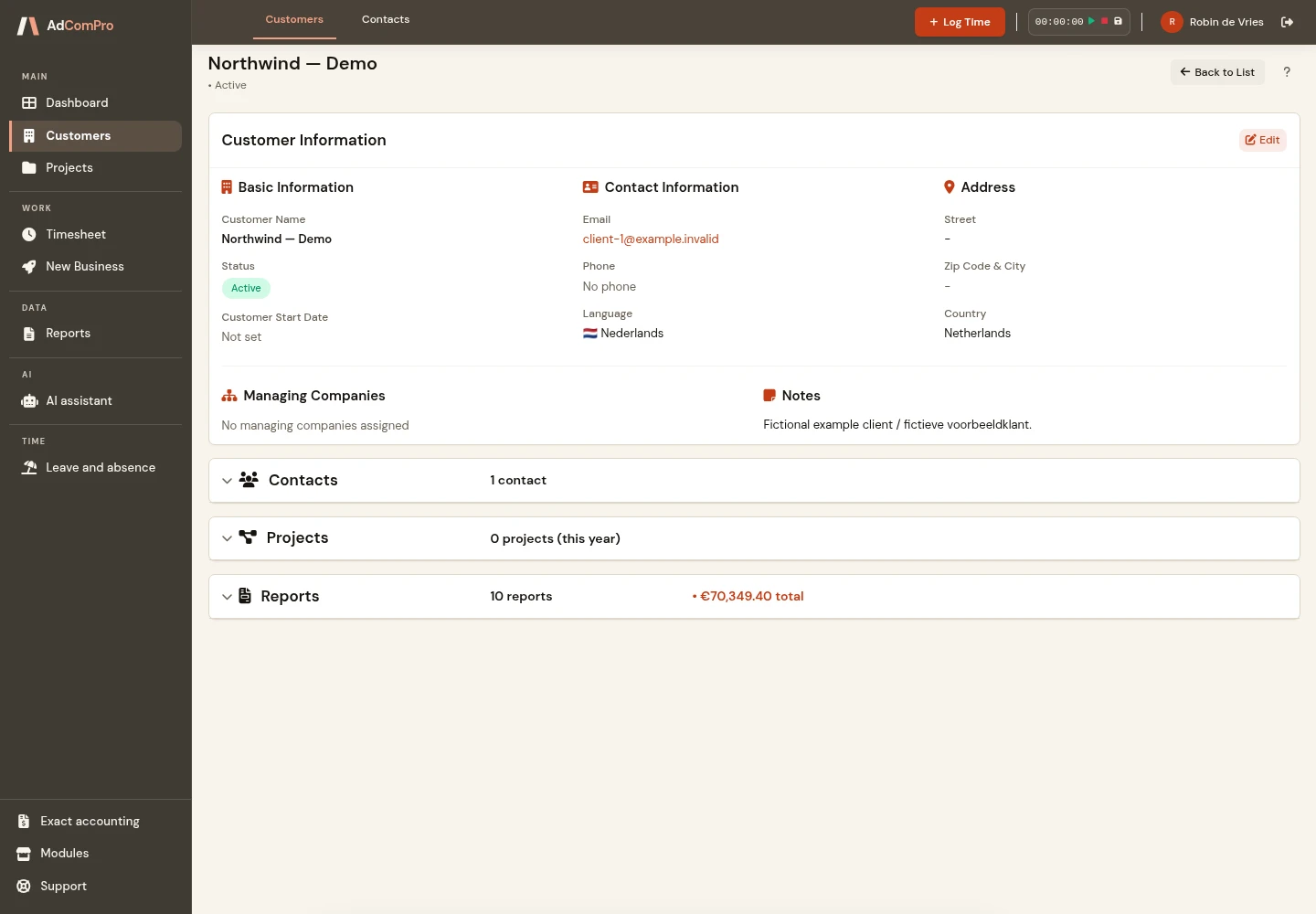
In AdComPro, a client record holds company details and provides access to related projects. You can maintain several contacts with names, roles, email addresses and phone numbers, and identify a primary contact. That gives colleagues a practical starting point when they need to reach someone at the client.
Internal notes provide space for information your team needs. The change log records updates to client details, including who made a change and which fields changed. For example, you can trace an amended email address instead of relying on a copy in someone’s personal address book.
Good client management software for agencies also depends on clear habits. Agree who creates new records and who checks contact details. Start with current clients and make sure the people handling their projects know where to find the information. The aim is a usable shared record, not simply a larger database.
Manage new business before it becomes a client project
New Business uses a Kanban pipeline with Lead, In Progress, Won and Lost stages. A prospect can hold company and contact details, the source of the opportunity and its expected value. The pipeline gives your team a way to discuss active opportunities and their current stage.
When an opportunity is won, you can convert the prospect into a client. Review the details and carry the recorded contact and address information into the new client record. If an opportunity is lost, a reason such as budget or timing can be recorded. These records support a more concrete discussion of your sales process than a list of names alone.
See the time your agency invests in winning work
Discovery calls, proposal writing and pitch preparation take time even when no project follows. AdComPro lets you record time against a prospect and a prospect task. These entries are non-billable and remain separate from project time; they do not become chargeable client hours simply because the opportunity is won.
This makes the effort spent on new business visible. Review it alongside the opportunity and its outcome when discussing how your team uses its capacity. It is a record of time invested, not a prediction of revenue or a guarantee of profitability. The clients and new-business guide explains the workflow in more detail.
Connect the relationship to delivery and invoicing
Once a client is ready to proceed, the work moves into a project. Organise it into milestones and tasks, record the time spent and monitor its budget. Different assignments remain separate projects while belonging to the same client, which helps when an account includes both a one-off campaign and continuing support.
Time recording and invoicing have their own checks. AdComPro supports time tracking with approval and invoices based on logged hours. The CRM connects the client information to that workflow; winning an opportunity does not replace project setup, time approval or invoice preparation.
Illustrative scenario: from discovery call to campaign
The following is a fictional example of how a marketing agency could use the workflow, not a customer case study. A prospective client asks for a launch campaign. The account manager records the company, contact and expected value, then tracks the discovery call and proposal work against the prospect.
After the proposal is accepted, the agency converts the prospect into a client and checks the company details. It adds the client’s campaign coordinator as a contact and starts a project with milestones for strategy, content and design. The delivery team records project time as the work progresses.
Before a progress meeting, the account manager opens the client record and the relevant project. A colleague taking over the account can use the same information. Finance later reviews approved project hours for invoicing. This is where CRM for marketing agencies becomes part of delivery rather than a list used only during sales.
How to evaluate a CRM for your agency
Use a familiar piece of work in your evaluation. Add two client contacts, create an opportunity and follow it through to a project. Ask a colleague to find the right contact and the associated work without your help. Check where acquisition time appears and whether it remains separate from billable delivery.
Also consider your essential requirements outside this workflow. If email synchronisation, marketing automation or a particular integration is a deciding factor, ask for that exact functionality to be demonstrated before choosing. Do not assume it is included because a product is described as a CRM. Compare the current plans and pricing with the support and setup your agency needs.
Questions about agency CRM software
Which types of agencies can use AdComPro?
It is relevant to agencies that manage client projects, time, budgets and invoices, including marketing, advertising, communications and consulting teams. Test the workflow against your own type of work rather than deciding from the agency label alone.
Can we keep prospects separate from existing clients?
Yes. Opportunities are managed in New Business, while established clients have client records with contacts and projects. A won prospect can be converted into a client after you review its details.
Can we record non-billable pitch time?
Yes. Time can be recorded against a prospect and its tasks. These entries are non-billable and separate from project hours, so you can see the effort invested before a client assignment begins.
Is client management included in AdComPro?
Client management and new business are part of AdComPro alongside project management, time tracking and invoicing. Check the pricing page for current plan details and support options.
What should we test during the free month?
Choose a prospect, an active client with several contacts and one representative project. Work through the handover from sales to delivery and ask another team member to use the records. This shows which setup and working agreements your agency needs.
Try the workflow with your own agency
Use the free month to add a prospect, create a client record and work through a representative project. Invite a colleague to check whether the information is clear enough for a handover. If you would like to discuss your requirements first, contact Marcel for a personal demonstration. You can also explore all AdComPro features before you start.